

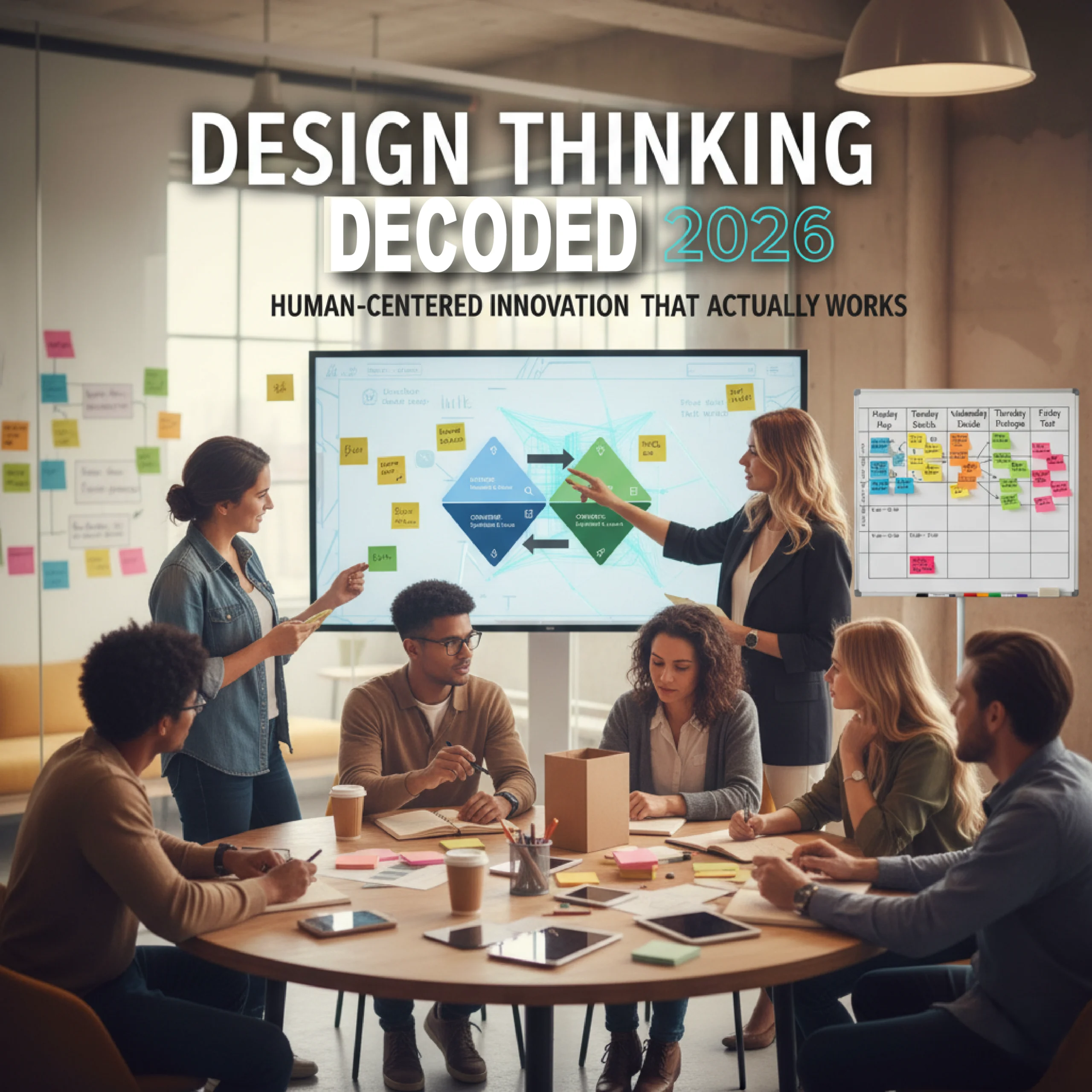
Look, I’ll level with you—I’ve sat through enough design thinking workshops to last a lifetime. You know the drill: sticky notes everywhere, someone inevitably brings up IDEO, and there’s always that one person who takes the « yes, and » improv rule way too seriously. But here’s the thing that gets me every single time: when it actually works? When a team genuinely cracks open a problem using this framework? It’s like watching magic happen in slow motion.
So why are we talking about this in 2026? Because design thinking has evolved. It’s shed some of its startup-y buzzword baggage and matured into something genuinely useful. AI’s changed the game. Remote work’s rewritten the playbook. And honestly? The world needs better problem-solving more than ever.
Whether you’re a seasoned designer who’s been doing this since the d.school days, a UI/UX pro looking to level up your process, or a marketing team trying to crack user needs—this isn’t your typical design thinking primer. We’re going deep, we’re getting practical, and we’re cutting through the fluff.

1. The Five Sacred Stages (And Why They’re Not Actually That Sacred)
Alright, let’s talk about what are the five stages of the design thinking process. If you’ve done even a cursory Google search, you already know them: empathize, define, ideate, prototype, and test. But knowing the names is like knowing the ingredients to a perfect espresso—it doesn’t mean you can pull a decent shot.
Empathize: Getting Into Your User’s Head (Without Being Creepy)
Here’s where most teams stumble right out of the gate. They think empathy means asking people what they want. Spoiler alert: people are terrible at knowing what they want. Henry Ford’s famous quote about faster horses wasn’t wrong.
Why is empathy the first stage in design thinking? Because assumptions are project killers. I’ve watched teams spend months building features nobody asked for because they skipped this step. Real empathy means observation, deep listening, and what I call « the uncomfortable silence »—that moment in an interview when you shut up and let someone actually think.
What is an empathy map and how is it used? Think of it as your cheat sheet for understanding humans. It’s a collaborative visualization tool that captures what users say, think, do, and feel. In 2026, most teams use digital empathy maps in tools like Miro or FigJam, but honestly? There’s something about the tactile nature of physical sticky notes that still hits different.
Pro tip from the trenches: Record your interviews (with permission, obviously). You’ll catch nuances you missed in the moment. And for the love of good design, actually watch people use your product. Not in a lab—in their natural habitat.
Define: The Art of Problem Framing
This is where the magic happens—or where projects go to die. The define stage is about synthesizing all that empathy research into a crystal-clear problem statement. Not a solution disguised as a problem. Not a vague aspiration. A specific, actionable insight.
I learned this the hard way on a project three years ago. We thought we were solving for « users need better navigation. » Turns out, after actually defining the problem properly, the real issue was « users can’t find their purchase history because we buried it four clicks deep in settings. » See the difference? One’s a problem statement. The other’s already pointing toward solutions.
The best problem statements follow the « How Might We » format. It’s simple, it’s generative, and it keeps you from jumping to solutions. How might we help users access their purchase history intuitively? That’s a problem worth solving.
Ideate: Where Quantity Beats Quality (For Now)
What tools are used in the ideate phase? Everything from classic brainstorming to mind mapping, SCAMPER techniques, and—here’s where 2026 gets interesting—AI-assisted ideation. Tools like ITONICS Innovation OS now use machine learning to suggest unexpected solution pathways based on your problem statement.
But let’s be real: the best ideation still happens when you get diverse minds in a room (virtual or physical) and let them riff. The key is quantity first, judgment later. I’ve seen billion-dollar ideas emerge from the stupidest-sounding suggestions. That’s brainstorming in design thinking at its finest—creating psychological safety for wild ideas.
Personal favorite technique: « Worst Possible Idea » sessions. Tell your team to come up with the absolute worst solutions. It loosens people up, gets them laughing, and ironically often leads to breakthrough insights when you flip those terrible ideas on their heads.
Prototype: Build to Think, Not to Perfect
How do you create effective prototypes in design thinking? The counterintuitive answer: make them as rough as possible while still being testable. Your first prototype should be held together with duct tape and prayers.
In 2026, we’ve got incredible prototyping tools—Figma’s AI-enhanced features, Adobe XD’s voice prototyping, InVision Studio’s animation capabilities. But you know what still works? Paper sketches. Clickable wireframes. Even storyboards. The fidelity should match your level of uncertainty.
I watched a team waste three weeks perfecting a high-fidelity prototype only to discover in testing that users fundamentally misunderstood the core concept. Start ugly. Iterate fast. The prototype test phase works best when you’re not emotionally attached to what you’ve built.
Test: Where Humility Meets Reality
Here’s the brutal truth about testing: users will break your assumptions in ways you never imagined. And that’s exactly the point. This isn’t about validation—it’s about learning. Tools like UserTesting and Maze make remote testing seamless, but nothing replaces watching someone struggle with your design in real-time.
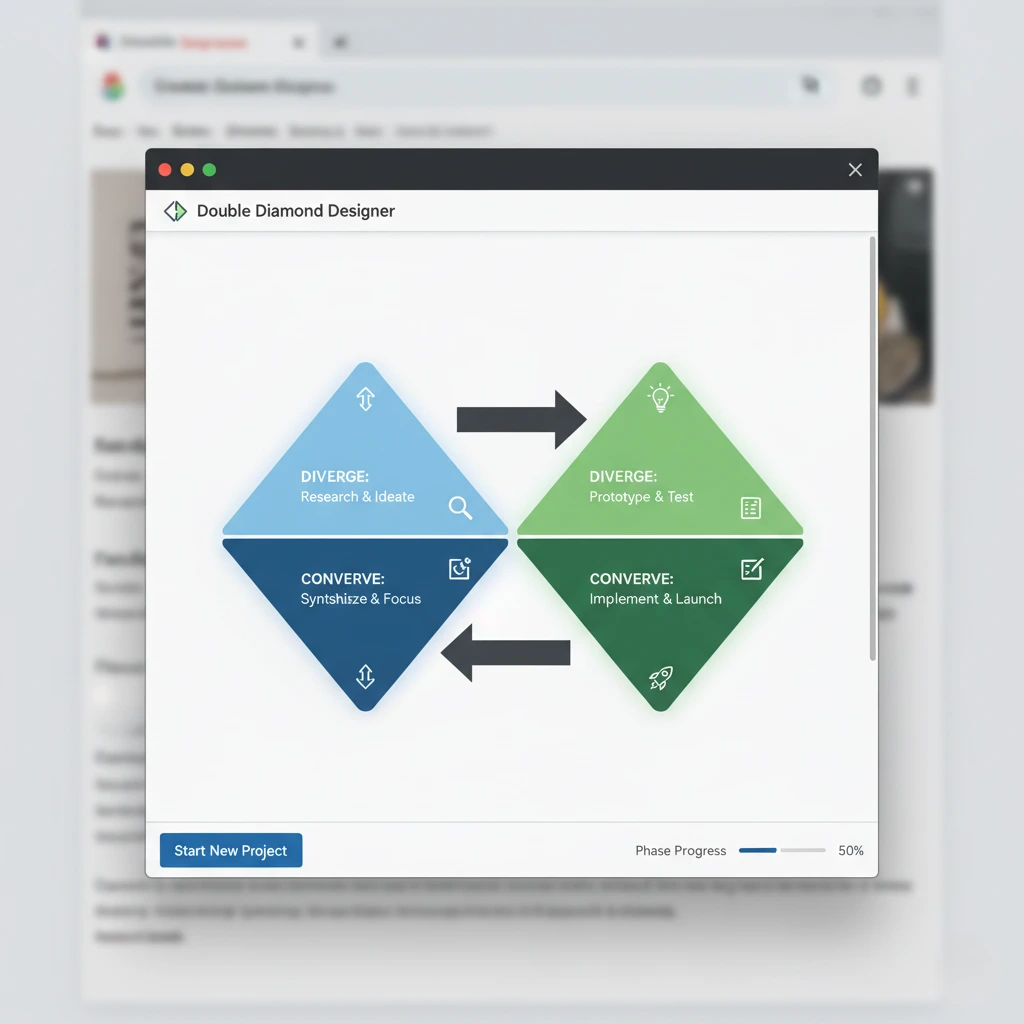
How does iteration work in the design thinking process? It’s not linear. You test, learn something unexpected, maybe jump back to define, then re-ideate, prototype again. It’s messy. It’s supposed to be. The double diamond process visualizes this perfectly—diverge, converge, diverge, converge.
2. Design Thinking vs. Everything Else (What Makes It Different?)
How does design thinking differ from traditional problem-solving? Traditional approaches start with the solution. Design thinking starts with the problem—or more accurately, with understanding the humans experiencing the problem.
Traditional: « Let’s build a mobile app. »
Design thinking: « Let’s understand why users are frustrated with our current experience, then figure out if a mobile app is even the right solution. »
How does design thinking differ from agile? They’re complementary, not competing. Agile is great for execution—iterative development, quick sprints, continuous delivery. Design thinking is about what to build and why. Agile is about how to build it efficiently. Smart teams use both.
The beauty of human-centered design thinking is that it forces you to challenge your assumptions. It’s uncomfortable. Executives hate it because it slows down the « just build it » mentality. But you know what’s slower? Building the wrong thing and having to start over.
3. Can Design Thinking Be Applied Outside of Product Design? (Absolutely)
Can design thinking be applied outside of product design? Hell yes. I’ve seen it transform everything from HR onboarding processes to hospital patient experiences to city planning initiatives. Anywhere there are humans with problems, design thinking can help.
Examples of design thinking in business are everywhere once you start looking:
- Airbnb famously used design thinking to pivot from failing startup to hospitality giant
- IBM trained over 100,000 employees in design thinking to shift their entire corporate culture
- Oral-B redesigned toothbrushes by watching kids struggle to grip them—leading to their chunky, easy-hold designs
The sustainable design thinking movement is particularly exciting. Teams are now asking « How might we solve this problem without creating new environmental problems? » during the define stage. It’s design thinking with a conscience.
4. Your 2026 Design Thinking Toolbox (What Actually Works)
Let’s talk tools. The landscape has exploded, and honestly, it’s overwhelming. Here’s what I actually use and recommend:
| Stage | Best Tool | Why It Wins |
|---|---|---|
| Empathize | Loom + Notion | Async video interviews capture genuine reactions; Notion organizes insights beautifully |
| Define | Miro | Infinite canvas for clustering insights, plus templates for empathy maps and problem statements |
| Ideate | FigJam + ITONICS | FigJam for team brainstorms; ITONICS for AI-assisted ideation when you’re stuck |
| Prototype | Figma | Industry standard, collaborative, and now with AI features that speed up low-fi to high-fi transitions |
| Test | Maze | No-code testing with real-time analytics—see where users click, hesitate, and rage-quit |
For remote design thinking tools, the MVP stack is honestly just Miro + Figma + Zoom. Everything else is gravy. Don’t let tool paralysis stop you from actually doing the work.
5. How Has AI Impacted the Design Thinking Process in 2026?
This is where things get fascinating. How has AI impacted the design thinking process in 2026? It’s amplified every stage—but it hasn’t replaced the human element. Not even close.
AI-assisted ideation process tools can now analyze your empathy research and suggest solution pathways you’d never think of. ITONICS Innovation OS, for example, uses machine learning to connect your problem statement with analogous solutions from completely different industries. It’s like having a really well-read designer looking over your shoulder.
Figma’s AI features can transform rough sketches into polished components. Adobe XD can suggest layout improvements based on usability heuristics. But—and this is crucial—AI is a collaborator, not a replacement. The messy, human work of empathy? Still irreplaceable. The creative leaps during ideation? Still need human intuition.
What AI has done is democratize access. Design thinking for beginners 2026 looks different than it did five years ago because AI tools lower the technical barriers. You don’t need to be a Figma wizard to create testable prototypes anymore.
6. What Are Common Challenges in Implementing Design Thinking? (And How to Fix Them)
Let’s get real about what are common challenges in implementing design thinking:
- « We don’t have time for all this empathy stuff » – This is code for « we’ve already decided what to build. » Counter it by showing the cost of building the wrong thing. One week of user research can save six months of development.
- « Our users don’t know what they want » – Correct! That’s why you observe behavior, not just ask questions. Watch what people do, not what they say.
- « Design thinking is just fancy brainstorming » – It’s structured problem-solving with empathy built in. The framework matters because it forces you to validate assumptions before committing resources.
- « Remote teams can’t do design thinking effectively » – Wrong. Remote design thinking tools have matured beautifully. Miro’s actually better than physical whiteboards for some activities because you can save, iterate, and collaborate asynchronously.
The biggest challenge though? Getting buy-in from stakeholders who want immediate solutions. Design thinking requires patience and trust in the process. That’s hard to sell in quarterly-earnings-driven cultures.
7. Design Sprints: When You Need Answers Yesterday
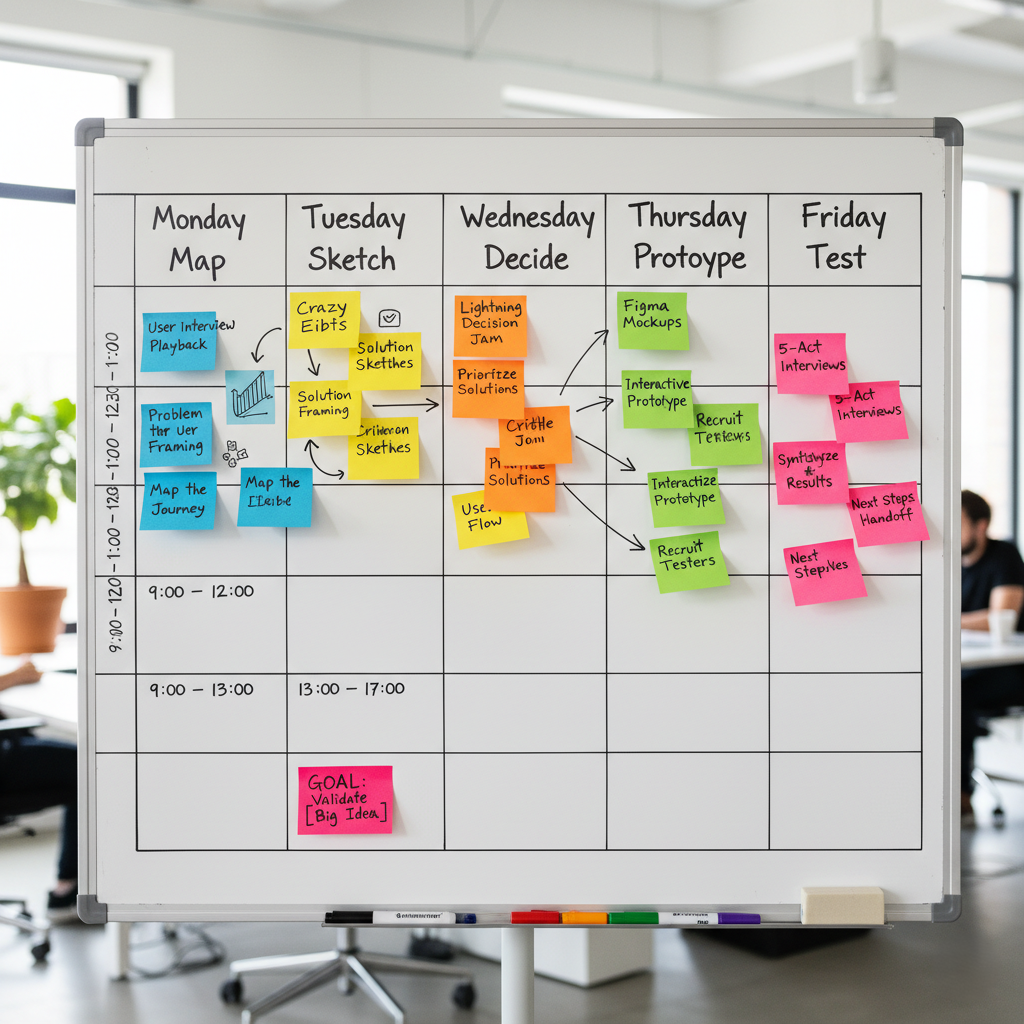
The design sprints methodology deserves special attention. Developed by Google Ventures, it’s essentially design thinking on steroids—a five-day process that takes you from problem to tested prototype.
Here’s how it breaks down:
- Monday: Map the problem
- Tuesday: Sketch solutions
- Wednesday: Decide on the best idea
- Thursday: Build a realistic prototype
- Friday: Test with real users
I’ve run dozens of these, and they’re intense. But when you need to validate a concept quickly or break through analysis paralysis, nothing beats a well-run sprint. The Sprint Book by Google Ventures is still the definitive guide, and honestly, it’s worth reading even if you never run a formal sprint.
8. Level Up Your Skills: Where to Learn More
Looking for design thinking certification courses? There are tons, but quality varies wildly. Here’s what’s actually worth your time and money in 2026:
- IDEO U – The OGs of design thinking. Pricey but comprehensive.
- Stanford d.school – Free resources and occasionally open courses. Their Design Thinking Bootcamp recordings are gold.
- Interaction Design Foundation – Budget-friendly membership with solid courses on human-centered design.
For self-directed learning, grab the Design Thinking Playbook. It’s practical, exercise-heavy, and you can work through it with your team. The IDEO Design Kit is completely free and surprisingly comprehensive—they’ve basically open-sourced their methodology.
Want design thinking case studies from 2026? Keep an eye on IDEO’s case study library, Nielsen Norman Group’s research, and the Stanford d.school’s project archives. Real-world examples beat theory every time.
9. Running Your First Workshop: A Practical Template
Need a design thinking workshop template? Here’s one I’ve refined over dozens of sessions:
| Time | Activity |
|---|---|
| 0-15 min | Intro: Explain design thinking, set ground rules (defer judgment, encourage wild ideas) |
| 15-45 min | Empathize: Share user research, create empathy maps, discuss pain points |
| 45-75 min | Define: Synthesize insights, write How Might We statements, vote on top problem |
| 75-90 min | Break (seriously, don’t skip this) |
| 90-120 min | Ideate: Brainstorm solutions (quantity over quality), use Crazy 8s or similar techniques |
| 120-150 min | Prototype: Sketch, storyboard, or wireframe top 2-3 ideas |
| 150-180 min | Test: Present prototypes to each other, gather feedback, plan next steps |
This three-hour format works well for teams new to design thinking. For remote sessions, add an extra 30 minutes for tech setup and breaks. Use Miro or FigJam as your virtual workspace—set up templates beforehand to save time.
10. The Honest Truth About Design Thinking
Here’s what nobody tells you in the glossy case studies: design thinking doesn’t guarantee success. It’s not a magic framework that automatically produces billion-dollar ideas. What it does do is reduce the chances of spectacular failure.
The design thinking stages explained aren’t a rigid recipe—they’re a framework for structured creativity. Some projects need more empathy work. Others can breeze through ideation. The best practitioners know when to follow the process religiously and when to adapt it.
User-centered innovation isn’t about making everyone happy. It’s about solving real problems for real people. Sometimes that means saying no to feature requests that don’t align with core needs. Sometimes it means building something users didn’t explicitly ask for because you understood their underlying problem better than they did.
The agile design thinking process works because it forces humility. Every test is a chance to be wrong. Every prototype is an assumption waiting to be challenged. That’s uncomfortable for teams used to being the experts.
Where Do You Go From Here?
Look, I get it. You’ve just read 2000 words about empathy maps and prototyping and you’re probably thinking, « Great, another framework to learn. » But here’s my challenge to you:
Pick one problem you’re working on right now. Just one. Before you jump to solutions, spend one week—just five days—really understanding the people experiencing that problem. Talk to them. Watch them. Build an empathy map. See what changes.
You don’t need the perfect toolkit. You don’t need a five-day sprint or stakeholder buy-in or design thinking certification. You just need curiosity and a willingness to challenge your assumptions.
The best tools for design thinking prototyping? The ones you’ll actually use. The best design thinking methodology? The one that helps your team make better decisions. The best time to start? Probably three months ago, but today works too.
Design thinking isn’t about being clever or innovative or disruptive—those are just buzzwords. It’s about being thoughtful, empathetic, and willing to be wrong. In 2026, with AI handling more of the execution, that human-centered approach matters more than ever.
So go build something. Make it rough. Test it with real people. Listen to their feedback. Iterate. Repeat. That’s the whole game.
Quick-Hit FAQ
What’s the difference between empathize define ideate prototype test and other problem-solving methods?
Traditional methods start with solutions. Design thinking starts with understanding humans. It’s the difference between « We should build X » and « Let’s understand the problem first, then figure out if X is even the right answer. »
How long does a complete design thinking cycle take?
Anywhere from five days (design sprint) to several months (complex products). It depends on problem complexity, team size, and resource availability. Don’t rush empathy—that’s where most projects go wrong.
Can I use design thinking for service design, not just products?
Absolutely. Some of the best applications are in service design—healthcare, education, financial services. Anywhere you have users interacting with systems, design thinking applies.
What if my stakeholders won’t give me time for user research?
Start small. Even two hours of user interviews beats zero. Show quick wins—when user insights prevent a bad decision, make sure leadership sees it. Build the case incrementally.
Is design thinking still relevant with AI doing so much of the work?
More relevant than ever. AI is a tool, not a replacement for human judgment. It can help with ideation and prototyping, but empathy? Problem framing? Strategic decisions? Still need humans.
Top Resources to Bookmark
Essential Tools:
- Miro (miro.com) – Your virtual whiteboard for everything
- Figma (figma.com) – Industry-standard prototyping with AI enhancements
- IDEO Design Kit (ideo.com/design-kit) – Free, comprehensive methodology guide
- Maze (maze.co) – No-code user testing that actually works
Learning Resources:
- Sprint Book by Google Ventures (gv.com/sprint) – The five-day process Bible
- Design Thinking Playbook – Practical exercises you can start today
- Stanford d.school resources – Free materials from the originators
Advanced Tools:
- ITONICS Innovation OS (itonics-innovation.com) – AI-powered workflows for complex projects
- UserTesting (usertesting.com) – Professional remote testing platform
- Notion (notion.so) – All-in-one workspace for documenting your process
Now stop reading and go talk to some users. That’s where the real learning happens.

 English
  French